
How to Use AI to Study Smarter in 2026: A Practical Student Guide
Studying for a difficult exam can feel frustrating when you spend hours with your books but still struggle to explain what you have learned. Maybe your notes are disorganized, a science concept does not make sense, or you keep forgetting information shortly after reading it. Artificial intelligence can help with these problems when you use it as a learning assistant rather than a replacement for studying.
Using AI for studying involves more than asking a chatbot to summarize a chapter. It can help you identify gaps in your knowledge, create practice questions, organize revision sessions, and check your understanding. When you learn how to use AI to study, you can turn confusing lessons into clear explanations, practice questions, and a more organized revision routine.
Learning how to use AI to study is about more than asking a chatbot to summarize a chapter. You can use AI to identify gaps in your knowledge, create questions from class notes, practice explaining difficult ideas, organize revision sessions, and receive feedback on your understanding. These activities can make study time more focused because they give you specific tasks to complete instead of leaving you to reread the same pages repeatedly.
The key is to stay involved. An AI tool may explain a topic incorrectly, misunderstand your instructions, or provide information that sounds convincing but is not accurate. Your textbook, teacher’s guidance, course materials, and independent judgment still matter.
This guide explains practical ways American high school and college students can include AI in their study routines, with sample prompts, subject-specific examples, and advice for using these tools responsibly. A useful way to use AI to study is to ask for hints before requesting a complete explanation. This gives you a chance to solve the problem independently and understand where you went wrong.

What Can AI Actually Do for a Student?
Think of AI as a flexible study partner. You can ask it to explain a concept in simpler language, turn your own notes into practice questions, help you organize a busy week, or point out where your explanation is incomplete.
For example, imagine that you are taking an introductory biology class and cannot understand the difference between mitosis and meiosis. You could ask an AI assistant to compare the two processes, explain why each occurs, and quiz you on their differences. After reviewing the response, you can close it and try to explain the processes from memory.
That last step is important. Receiving an explanation is not the same as learning it. You need to check whether you can use the information without looking at the answer.
AI can be useful for several study tasks:
- Breaking a complicated topic into smaller parts.
- Creating practice questions from material you provide.
- Suggesting a revision schedule based on your available time.
- Helping you identify mistakes in your reasoning.
- Organizing rough notes into a clearer structure.
- Offering alternative examples when the first explanation does not help.
Its value depends on the task, the quality of your instructions, and how carefully you review the output.
Start With the Problem You Need to Solve
Before opening an AI tool, decide what is making your studying difficult. A vague request such as “Help me study biology” gives the system little information about your needs.
A more useful request identifies the subject, the topic, your current understanding, and the kind of help you want.
For example:
“I am preparing for a high school biology test on cell division. I understand that cells divide, but I confuse mitosis with meiosis. Explain the main differences using simple language, then ask me five questions one at a time. Do not reveal an answer until I have tried.”
This request gives the AI a clear teaching role. It also keeps you involved by asking you to answer questions rather than simply reading a finished explanation.
Use the same approach for any subject. Identify the specific obstacle first, then ask for help with that obstacle.
How to Use AI to Study More Effectively
The best way to learn how to use AI to study is to start with a clear goal. Choose one topic you find difficult, ask for an explanation, and then test your understanding without looking at the answer. This approach keeps you actively involved in learning.
Some textbook explanations assume that students already understand the vocabulary or background ideas. When you encounter a difficult passage, ask AI to explain it at the level you need.
Knowing how to use AI to study effectively starts with choosing one specific learning problem instead of asking for help with everything at once.
Suppose a physics lesson introduces Newton’s second law. Rather than requesting a long summary of the entire chapter, ask for a plain-language explanation of the relationship between force, mass, and acceleration. Then request a simple example and one problem to solve independently.
You can also ask for several explanations of the same concept:
- Explain it in everyday language.
- Give an example from daily life.
- Compare it with a related concept.
- Describe a common misunderstanding.
- Ask me to explain it back to you.
If the first answer still feels confusing, tell the tool exactly which part you do not understand. A follow-up such as “I understand the definition, but I do not understand why acceleration changes when mass increases” is more useful than starting over with a broad request.
Verify important definitions, formulas, and technical details against your course materials. AI explanations are helpful starting points, not guaranteed authorities.
Turn Your Class Notes Into a Useful Study Guide
Students often collect notes from lectures, textbooks, slides, and online readings. The challenge is turning that information into something easy to review.
If your instructor permits the use of AI for this purpose, you can provide your own notes and ask the tool to organize them into headings, key terms, short explanations, and questions for revision.
Try this prompt:
“Organize the notes below into a study guide for my upcoming exam. Keep the original facts accurate, identify the main ideas, define important terms, and list any points that seem unclear. Do not add unsupported information. Finish with ten questions that test my understanding.”
After receiving the study guide, compare it with the original notes. Check that important details have not disappeared and that the tool has not changed the meaning of a definition.
A useful study guide should make revision easier without removing the details your instructor expects you to know. Keep the original notes available so you can return to them whenever something looks incomplete.
Create Flashcards That Test Your Memory
Flashcards are more effective when they require you to recall information instead of merely recognizing a familiar sentence. AI can help you prepare a set of questions and answers from your own course material.
For a psychology class, a card might ask, “What is classical conditioning?” The answer should contain a concise definition and, where useful, an example. For a statistics class, a card might ask when a particular formula is appropriate and what each variable represents.
Ask AI to avoid cards that are too broad. A question such as “Explain psychology” covers too much material to be useful as a single flashcard.
You can use this prompt:
“Create 20 flashcards from the material I provide. Each card should test one idea. Use a question on the front and a short answer on the back. Include a mix of definitions, comparisons, and application questions. Do not introduce facts that are absent from the source material.”
Review the cards without looking at the answers first. Mark the questions you miss, then revisit those topics later. If you use a flashcard app, transfer the verified cards into that app and schedule regular review sessions.

Ask AI to Quiz You Before an Exam
Reading notes can create a feeling of familiarity even when you cannot recall the information independently. A practice quiz helps reveal the difference. Students can use AI to study for exams by reviewing difficult topics, generating practice questions, and checking mistakes after each attempt. Compare the answers with your class notes to make sure the information is accurate.
Give AI a list of topics from your study guide and ask it to test you one question at a time. Request different types of questions, such as multiple-choice, short-answer, and scenario-based questions.
For example:
“Quiz me on the five topics listed below. Ask one question at a time and wait for my response. After each answer, explain what I got right, correct any mistakes, and identify the concept I should review. Do not make every question easy.”
Answer before viewing the explanation. If you guess, say so; a correct guess does not necessarily mean that you understand the material.
Keep a record of the questions you miss. If you repeatedly confuse two terms or make the same calculation error, that pattern tells you where to spend your next study session.
AI-generated quizzes should be checked against your class materials. They may include ambiguous wording, incorrect answers, or material that your course does not cover.
How to Use AI to Study With a Personalized Schedule
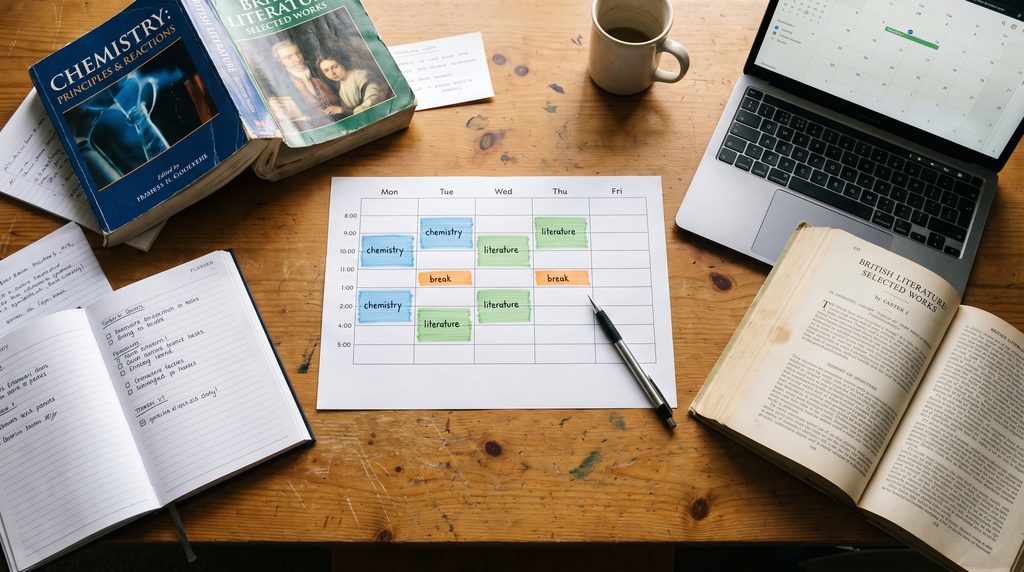
A study plan needs to reflect your actual week, not an ideal schedule that leaves no time for meals, work, travel, or rest.
Start by listing your exam dates, subjects, available study periods, and the topics that need the most attention. Ask AI to suggest a schedule that fits those constraints.
For example:
“I have a chemistry exam on Friday and an English literature test the following Monday. I can study for 45 minutes on weekdays and two hours on Saturday. I understand most chemistry definitions but struggle with calculations. Create a realistic revision plan that gives extra practice to calculations and leaves time for reviewing mistakes.”
Review the proposed schedule before following it. A tool may assign too many tasks to one session or underestimate the time a difficult chapter requires.
Keep each session focused on a clear result. Instead of writing “study chemistry,” write “solve six practice problems on molarity and check every calculation.” Specific tasks make it easier to judge whether you completed the session successfully.
Get Help With Math Without Copying Solutions
AI can explain mathematical reasoning, but copying a worked solution may leave you unable to solve a similar question during an exam.
When you are stuck, provide the problem and show the steps you have already attempted. Ask for a hint about the next step rather than the full answer.
For example:
“I am solving this algebra problem and reached the equation shown below, but I do not know how to isolate the variable. Give me one hint at a time. Let me try each step before you show another hint.”
This approach helps you locate the point where your understanding breaks down. If you make an error, ask why the step is incorrect and what rule applies.
For geometry, calculus, statistics, and other technical subjects, check calculations with your textbook, teacher, or a trusted mathematical tool. AI systems can make arithmetic errors or use an inappropriate method.
Once you understand the solution, solve a different problem without assistance. That independent attempt is a better test of learning than recognizing the answer you just read.
Study Science Through Questions and Examples
Science subjects require more than memorizing definitions. You may need to explain processes, interpret evidence, apply formulas, or predict what happens when a condition changes.
AI can help you practice these skills by asking “what if” questions.
In chemistry, ask how changing a variable could affect a reaction, then check the explanation against the rules taught in class. In biology, ask for a comparison between two processes and explain why each matters. In physics, request a practice problem that changes one value while keeping the others constant.
A useful prompt is:
“Use the notes below to create three application questions for my science class. Each question should require me to use the concept rather than repeat its definition. After I answer, explain the reasoning and identify any incorrect assumptions.”
Do not assume that every generated example reflects the exact conditions of a scientific rule. Review the units, assumptions, diagrams, and formulas. If an answer conflicts with your course material, investigate the disagreement rather than automatically accepting either response.
Improve Reading and Writing Skills With AI
For English, history, and other reading-heavy courses, AI can help you examine an argument, understand unfamiliar vocabulary, or organize ideas for a discussion.
After reading an assigned passage, write your own short summary. You can then ask AI to identify which major ideas your summary appears to omit. Compare its feedback with the original text and decide whether the suggested additions are relevant.
For writing assignments, use AI to discuss possible structures or review a draft when your instructor permits it. Ask whether your central claim is clear, whether each paragraph supports that claim, and whether the evidence actually supports your conclusion.
Avoid asking a tool to produce an essay for submission and presenting that work as your own. The purpose of writing assignments is often to evaluate your reasoning, interpretation, and ability to communicate. Follow your school’s policy on AI assistance, including any disclosure requirements.
A practical exercise is to ask AI to challenge your argument rather than rewrite it. If it identifies a weak point, respond with evidence from the assigned reading or revise your own reasoning.
Use AI to Identify Knowledge Gaps
One of the most useful study tasks is discovering what you do not yet understand.
After completing a chapter, close your notes and explain the main ideas in your own words. Then compare your explanation with the source material. You can also ask AI to turn your explanation into follow-up questions. To understand the technology behind many AI systems, read our guide to Machine Learning Explained.
Try this:
“I will explain this topic from memory. Identify statements that are vague, incomplete, or potentially incorrect. Ask follow-up questions that help me discover gaps in my understanding. Do not rewrite my explanation for me.”
This turns revision into a process of diagnosis. You can focus on the specific ideas that need work rather than spending equal time on everything.
However, the feedback may miss errors or incorrectly flag a valid explanation. Treat it as an additional perspective. Your textbook, teacher, and official course materials remain important checks.
Learn How to Verify AI Answers
An answer can sound polished and still be wrong. AI tools may mix up dates, invent references, simplify a complicated issue too far, or state an uncertain claim as a fact.
Use a simple verification routine whenever accuracy matters:
- Identify the factual claims that affect your answer.
- Compare definitions and explanations with your assigned textbook or course materials.
- Check important statistics, quotations, and historical dates against reliable original sources.
- Open references yourself to confirm that they exist and support the claim.
- Ask your instructor when the issue affects an assessment and the answer remains unclear.
Be especially careful when an AI tool supplies academic citations. Never include a source in a research paper just because the system generated a plausible title or author name.
For general background on machine learning, you can also read our guide to Machine Learning Explained.
Sample AI Prompts Students Can Adapt
The following prompts are starting points. Replace the bracketed details with your subject, course level, and actual study material.
For a difficult concept
“Explain [topic] at a level suitable for a [high school or college] student. Start with the basic idea, provide one example, and ask me a question to check my understanding.”
For exam practice
“Create a practice test using only these course topics: [list topics]. Mix question types and ask one question at a time. Wait for my response before explaining the answer.”
For reviewing notes
“Organize these notes into key ideas, important terms, and questions for revision. Preserve the original meaning and flag unclear information instead of guessing.”
For identifying mistakes
“Review my attempted solution to this problem. Point out the first step that may be incorrect and explain the rule involved. Give me an opportunity to correct it myself.”
For planning revision
“Help me plan study sessions before [exam date]. I have [available time] and need to review [topics]. Prioritize difficult topics and include time for practice and checking mistakes.”
For improving an argument
“Read my draft and identify where my reasoning is unclear, unsupported, or inconsistent. Do not write a replacement essay. Explain what I should reconsider.”
The most useful prompts define a clear task, provide relevant context, and ask the tool to support your thinking rather than finish the entire task on your behalf.
Mistakes That Can Make AI Study Less Effective
AI does not automatically make studying more productive. Some habits can waste time or create false confidence.
Copying a summary without checking it: A summary may leave out a detail that your instructor considers essential. Compare it with the original source.
Reading answers instead of attempting questions: Looking at a solution can make it feel obvious. Try answering before asking for help.
Trusting every generated fact: Confirm important information through reliable sources, especially for graded work.
Using the same prompt for every subject: A language class, a mathematics course, and a lab science have different learning needs. Adjust your questions to the task.
Making a schedule that is too ambitious: A plan that cannot fit your actual day will quickly become frustrating. Start with a realistic amount of time.
Ignoring school rules: A tool that is useful for revision may not be permitted for a particular assignment or examination. Check the instructions first.
The goal is not to use AI for every possible task. It is to use it where it addresses a real learning problem.
Protect Your Privacy While Using AI
Before uploading notes or documents, check what they contain. Avoid sharing passwords, student identification numbers, private information about classmates, confidential research, or records that you are not authorized to disclose.
Course materials may also be subject to restrictions on sharing or uploading. Follow your school’s guidance and the tool’s applicable privacy terms.
If you use AI for research, keep track of the sources you actually consult. An AI-generated explanation is not a substitute for reading and citing the original source when your assignment requires evidence. Students should also check their school’s rules before using AI for assignments. For additional guidance, read the UK government’s AI in coursework: resources for schools.
For group projects, get permission before entering another student’s work or personal information into an external service. Use the minimum information necessary to complete the task.
A Simple Weekly Routine for Studying With AI
You do not need a complicated system to begin. Try this routine for one subject and adjust it according to your results.
At the beginning of the week: List the chapters, assignments, and upcoming tests. Choose two or three learning goals that you can realistically complete.
After each class: Review your notes and mark the parts that remain confusing. Ask AI for explanations or questions about those specific areas.
During revision sessions: Attempt practice questions without looking at the answers. Use feedback to identify errors, then return to the textbook or class notes.
Before the exam: Take a practice test under conditions similar to the real assessment. Review mistakes and spend additional time on weak topics.
At the end of the week: Write down what improved and what still needs attention. Use that information to plan the next week.
You can follow this routine with a notebook and one AI assistant. The important part is the cycle of studying, testing yourself, checking your work, and revising.
Frequently Asked Questions
Is AI useful for studying?
AI can be useful for explaining unfamiliar concepts, creating practice questions, organizing notes, and planning revision. Its effectiveness depends on how you use it and whether you verify its output.
Can AI help me prepare for exams?
Yes. You can use it to create practice questions, identify weak topics, explain difficult material, and build a revision schedule. Check the questions and answers against your course content.
Should I use AI to write my homework?
Only use AI to the extent permitted by your instructor and institution. Some assignments allow limited assistance, while others prohibit it. Never assume that AI-generated work can be submitted without disclosure.
Can AI replace a teacher or tutor?
AI can offer explanations and extra practice, but it cannot reliably replace a teacher who understands your course, evaluates your progress, and provides context-specific guidance. Ask your instructor about important misunderstandings.
How can I avoid learning incorrect information from AI?
Verify important claims against textbooks, class materials, official resources, and original research where appropriate. Check citations yourself and ask a qualified instructor when an answer remains uncertain.
What is the best way to start using AI for studying?
Choose one difficult topic, ask for a simple explanation, and then test yourself without looking at the response. Start with a small task and judge whether the tool genuinely helps you understand the material.
What is the best way to use AI to study?
The best way to use AI to study is to use it for explanations, practice questions, revision planning, and feedback while checking important information against reliable course materials.
How can I use AI to study more efficiently?
You can use AI to study more efficiently by creating practice questions, clarifying difficult concepts, organizing revision sessions, and checking your understanding without relying on generated answers alone.
Final Thoughts
A consistent routine is often the most practical way to use AI to study without becoming dependent on automated answers.
The most effective way to use AI for studying is to give it a specific job while keeping responsibility for learning in your own hands. Ask questions when a concept is confusing, use practice quizzes to reveal gaps, organize revision around your real schedule, and verify answers before relying on them.
Do not judge a study session only by how quickly you finish reading. Judge it by what you can explain, solve, or remember afterward without assistance.
Start with one subject this week. Choose a topic that has been difficult, use AI to work through it, and finish by answering a few questions independently. If you understand more than you did before, keep the method. If you do not, adjust your approach and check the source material.
AI is most valuable when it helps you become a more capable learner—not when it does the learning in your place. Ultimately, learning how to use AI to study effectively means checking information, practicing independently, and using feedback to improve your understanding.