AI PC Explained: How It Works, Benefits, Uses & 2026 Guide
Artificial intelligence is no longer limited to cloud servers and online applications. It is increasingly becoming part of the computers people use every day. This shift has introduced a new type of computer known as an AI PC.
Unlike a traditional computer, an AI PC is designed with dedicated hardware that can handle certain artificial intelligence workloads directly on the device. This can make some AI-powered features more responsive while reducing the need to send every task to the cloud.
But what exactly makes a computer an AI PC? How does it work, and does it actually matter when buying a new laptop or desktop?
Let’s break it down.
What Is an AI PC?
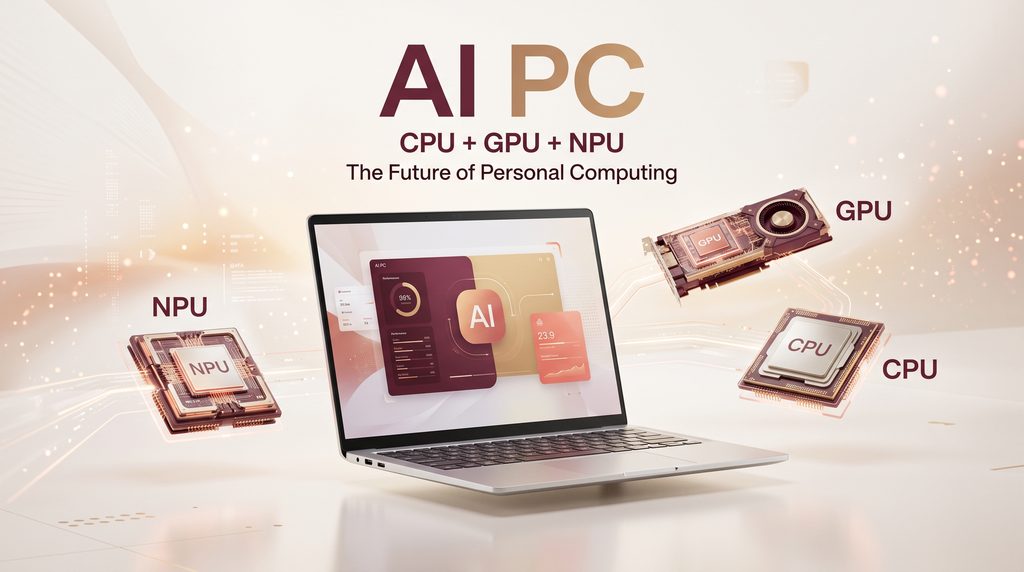
An AI PC is a computer designed to run artificial intelligence workloads more efficiently by combining a traditional CPU and GPU with a dedicated Neural Processing Unit (NPU).
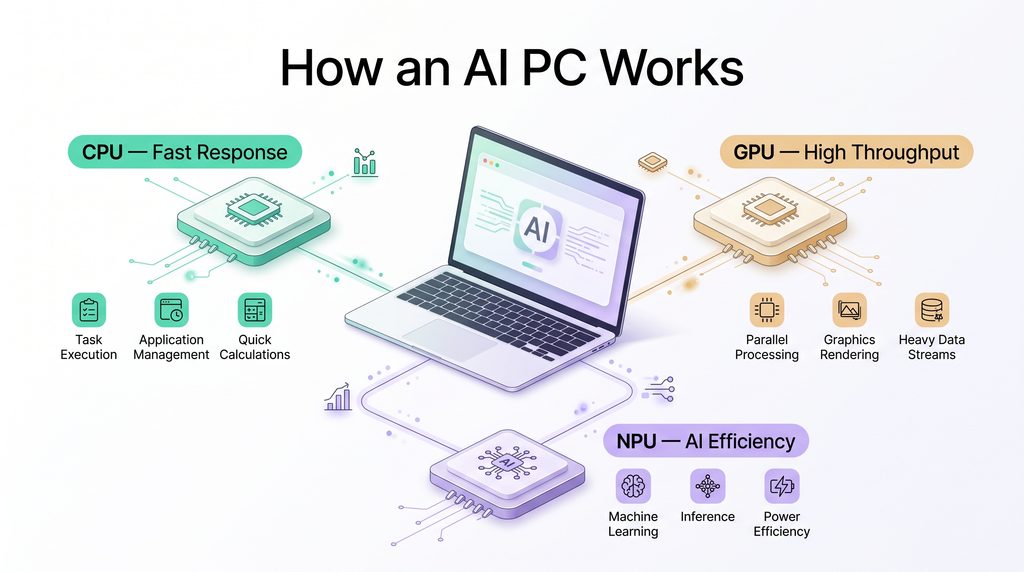
The three processors have different jobs:
- CPU: Handles general computing and tasks that require quick responses.
- GPU: Handles graphics and highly parallel workloads.
- NPU: Specializes in sustained AI workloads while aiming for better power efficiency.
This combination allows compatible applications and operating-system features to decide which processor is best suited to a particular workload.
An AI PC does not mean that every task on the computer is performed by artificial intelligence. Instead, it means the hardware is specifically equipped to accelerate supported AI workloads.
How Does an AI PC Work?
The biggest difference between an AI PC and an older computer is the presence of dedicated AI acceleration.
Imagine that you are using a video-call application. Background effects, noise reduction, or camera enhancements may require AI processing.
On a conventional computer, such work could place additional demand on the CPU or GPU. AI PCs combine traditional computer hardware with artificial intelligence capabilities to handle certain tasks more efficiently.
On an AI PC, compatible AI workloads can be moved to the NPU.
This creates a more specialized computing system where different processors can handle different types of work.
CPU: General-Purpose Processing
The CPU remains the main processor for everyday computing.
It handles tasks such as
- Running applications
- Managing operating-system processes
- Opening documents
- Web browsing
- General calculations
- Low-latency workloads
The CPU is still essential even when a computer contains dedicated AI hardware.
GPU: High-Throughput Processing
The GPU is designed to process many operations in parallel.
This makes it useful for:
- Graphics rendering
- Video editing
- Gaming
- Creative applications
- Large parallel workloads
- Some AI workloads
For demanding AI applications, the GPU can still play an important role.
NPU: AI Processing
The NPU is the part that gives an AI PC its dedicated AI acceleration.
It is designed for neural-network workloads and can handle certain AI operations using less power than running the same type of workload entirely on a general-purpose processor.
Intel describes the NPU as a dedicated accelerator for AI and machine-learning tasks that can run locally on the PC.
This does not make the NPU a replacement for the CPU or GPU. Instead, all three processors can work together.
What Is an NPU in an AI PC?
NPU stands for Neural Processing Unit.
It is a specialized processor designed specifically for artificial intelligence and machine-learning workloads.
The main reason NPUs matter is efficiency.
For example, an AI feature that continuously processes camera or audio information could consume significant processor resources if it relied entirely on the CPU.
An NPU can take on supported AI workloads while allowing the rest of the system to focus on other tasks.
Microsoft’s current 2026 guidance describes NPUs in Copilot+ PCs as specialized hardware capable of at least 40 trillion operations per second (TOPS), while also noting that Copilot+ PCs have specific hardware and software requirements.
However, TOPS alone should not be used to judge the entire computer. Software support, processor architecture, memory, graphics performance, thermals, battery capacity, and the actual applications you use also matter.
AI PC vs Traditional PC
The difference becomes easier to understand when the two types of computers are compared.
| Feature | Traditional PC | AI PC |
| CPU | Yes. | Yes. |
| GPU | Usually | Yes. |
| Dedicated NPU | Not necessarily | Yes. |
| Local AI acceleration | Limited by hardware | Designed for supported AI workloads |
| AI-powered features | Software dependent | Hardware + software optimized |
| Cloud dependency | Varies | Can be reduced for supported tasks |
| Power efficiency for AI | Depends on workload | NPU can improve efficiency for supported workloads. |
An AI PC is therefore not simply a computer with an AI application installed.
The important difference is the hardware architecture behind supported AI features.
Benefits of an AI PC
AI PCs can provide several practical advantages, especially as more applications begin to use on-device AI.
1. Faster Local AI Features
When a compatible AI workload runs locally, it does not always need to travel to a remote server.
This can reduce dependence on an internet connection for supported features and may make certain interactions feel more responsive.
Microsoft’s 2026 AI PC guide highlights local processing for features such as intelligent search, image generation, and real-time translation.
2. Better Power Efficiency
Running an AI workload continuously on a CPU can consume considerable power.
A dedicated NPU is designed for AI workloads that can run efficiently at lower power.
This is particularly useful for laptops, where battery life is an important consideration.
3. Improved Privacy for Some Workloads
One of the most interesting advantages of local AI is that supported processing can happen directly on the computer.
Instead of automatically sending every piece of information to a cloud service, certain AI features can process information locally.
Microsoft also describes Copilot+ PC components as supporting on-device AI experiences using dedicated hardware such as an NPU.
However, local AI does not automatically mean complete privacy. Different applications have different data-handling policies, so users should still check what information an application sends to external servers.
4. Offline AI Capabilities
Some on-device AI features can continue working without an active internet connection.
This can be useful for:
- Travelers
- Students
- Remote workers
- People with unreliable internet
- Users working away from Wi-Fi
The exact offline capabilities depend on the software and hardware.
5. Better AI Integration
Instead of opening a separate website every time you want to use an AI feature, operating systems and applications can integrate AI directly into everyday workflows.
That could mean AI-assisted:
- Writing
- Searching
- Image editing
- Video calls
- Translation
- Accessibility
- Productivity
Common AI PC Uses
The technology becomes more useful when you look at real-world examples.
AI Video Calls
AI can help improve video calls through features such as
- Background effects
- Noise suppression
- Automatic framing
- Camera enhancements
- Audio processing
These workloads can potentially be handled more efficiently with dedicated AI hardware.
AI Photo Editing
Modern photo applications can use AI to:
- Remove unwanted objects
- Improve image quality
- Remove backgrounds
- Adjust lighting
- Enhance details
Some of these features can benefit from local AI acceleration.
Content Creation
Writers, designers, video editors, and other creators can use AI-enabled applications for different parts of their workflow.
An AI PC may help accelerate supported features inside applications rather than simply acting as a faster version of a traditional computer.
Productivity
AI PCs can also assist with everyday productivity.
Examples include:
- Summarizing information
- Organizing notes
- Drafting text
- Searching for information
- Improving documents
- Translating content
The exact features available depend on the operating system and applications installed.
AI PC and On-Device AI
AI PC technology is closely connected to on-device AI.
On-device AI means that some artificial intelligence processing takes place directly on the user’s computer instead of relying completely on remote cloud servers.
This can be useful when speed, privacy, power consumption, or offline functionality matters.
If you already have an article about on-device AI, this is a natural internal-link opportunity.
Internal link: Link only the exact words “On-Device AI” to your existing On-Device AI article.
AI PC Security and Privacy
Security is another area where local AI can be useful.
When an AI task is processed locally, certain information does not need to be transmitted to an external service for that particular task.
This can reduce the amount of data moving between the device and the cloud.
AI hardware can also support security-related software features. Intel notes that AI PCs can use local AI processing for security-related workloads and threat-detection scenarios.
Still, an AI PC is not automatically secure.
Users should continue using:
- Strong passwords
- Multi-factor authentication
- Security updates
- Trusted applications
- Encryption
- Secure Wi-Fi
- Regular backups
Hardware-based AI capabilities are only one part of a complete security strategy.
Internal link: Link only “Cybersecurity” to your existing Cybersecurity article if that word already appears naturally in this section.
AI PC and Cloud Computing
AI PCs do not completely replace cloud computing.
Instead, the two approaches can work together.
A computer might perform smaller or supported AI tasks locally while using cloud infrastructure for larger workloads.
For example:
Local AI:
Quick device-level processing, camera effects, audio enhancement, or selected AI tools.
Cloud AI:
Large-scale AI models, demanding workloads, centralized processing, and services that require remote infrastructure.
This creates a hybrid approach where the computer and cloud can each handle workloads suited to them.
Internal link: Link only the exact words “Cloud Computing” to your existing Cloud Computing article.
What to Look for When Buying an AI PC in 2026
If you’re planning to buy a new laptop or desktop, don’t choose a device simply because its marketing says “AI.”
Look at the actual hardware and software.
Check the NPU
A dedicated NPU is one of the most important hardware features of an AI PC.
Check its AI-processing capability and whether the applications you use actually support it.
Check RAM
AI applications can consume considerable memory.
For a modern productivity computer, adequate RAM is important because your browser, applications, operating system, and AI tools may all be running at the same time.
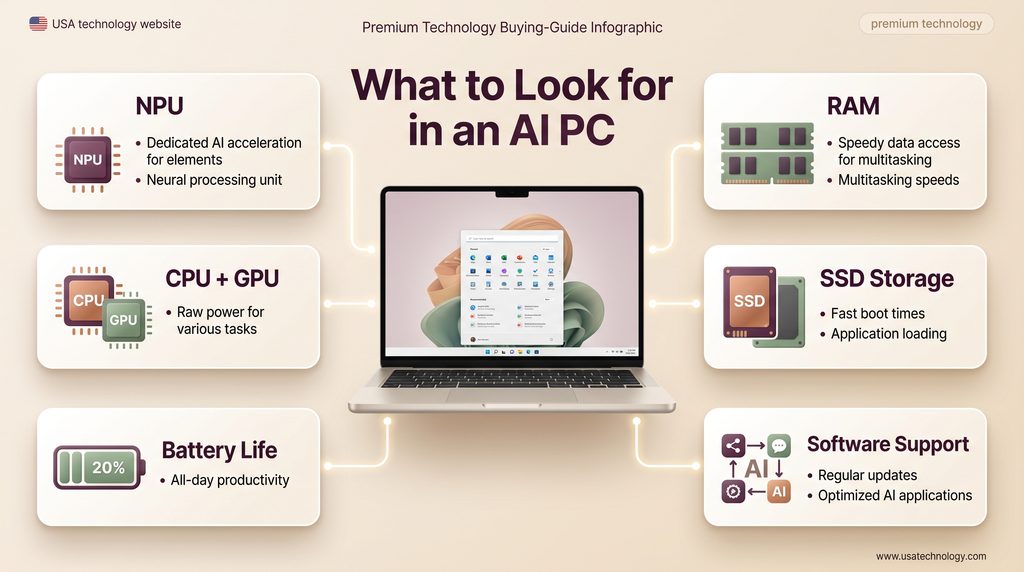
Check Storage
An SSD provides faster everyday performance than older mechanical storage.
It is also useful to have enough capacity for applications, media files, projects, and locally stored AI models where applicable.
Check the CPU and GPU
Don’t focus entirely on the NPU.
The CPU and GPU still determine much of your computer’s general performance, gaming ability, creative performance, and multitasking capability.
Check Software Compatibility
Hardware is only useful when software can take advantage of it.
Before buying, check whether your preferred applications support the AI features and hardware acceleration you actually need.
Consider Battery Life
If you’re buying a laptop, battery performance can be just as important as processor specifications.
A good AI PC should balance performance with efficiency rather than simply offering the highest theoretical processing numbers.
Are AI PCs Worth It in 2026?
For someone buying a new computer, an AI PC can make sense if they expect to use AI-powered applications and features regularly.
Students may benefit from AI-assisted productivity and accessibility tools.
Creators may use AI-powered photo, video, and design features.
Business users may benefit from local processing, productivity features, and supported security tools.
But upgrading an otherwise perfectly good computer only because the label says “AI PC” may not be necessary.
If your current PC already handles your work well and you rarely use AI-powered applications, the practical benefit of upgrading may be smaller.
The better approach is to consider your actual workload first and then determine whether dedicated AI hardware provides a useful advantage.
What Is the Future of AI PCs?
AI PC development is moving toward deeper integration between hardware, operating systems, and applications.
Instead of AI being something you open in a browser, more computing tasks may gradually include AI features directly inside the operating system and everyday software.
Microsoft’s current Windows guidance already describes built-in on-device AI components and dedicated NPU processing for Copilot+ PCs.
This could eventually make AI features feel less like separate applications and more like a normal part of using a computer.
The important question will not simply be whether a computer has AI hardware.
It will be what that hardware can actually do for the user.
Final Thoughts
An AI PC is more than a normal computer with an AI chatbot installed.
It combines a CPU, GPU, and NPU to handle different types of workloads, with the NPU providing dedicated acceleration for supported AI tasks.
The biggest potential advantages include more efficient local AI processing, better integration with AI-enabled software, reduced cloud dependence for supported tasks, and new possibilities for productivity, creativity, communication, and security.
As AI becomes a more common part of everyday software, dedicated AI hardware is likely to become increasingly relevant.
But when choosing a computer, don’t buy based on the “AI” label alone. Look at the NPU, CPU, GPU, RAM, storage, battery life, software compatibility, and the tasks you actually perform.
That is what determines whether an AI PC will genuinely improve your computing experience.