Cloud Computing Explained: How It Works, Benefits, Types, and Real-World Uses
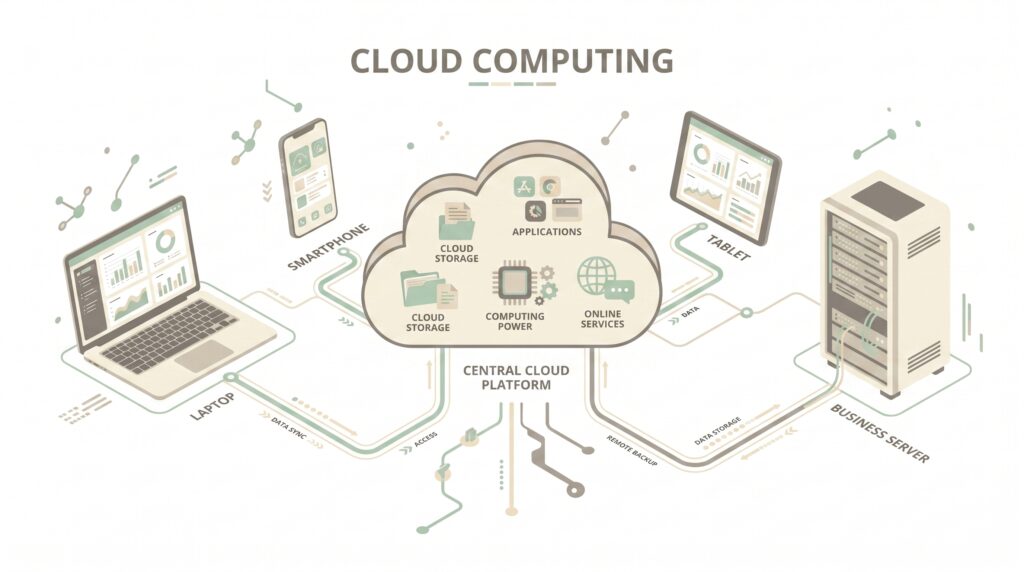
Cloud computing has changed the way people and businesses use technology. Instead of depending entirely on physical computers and servers, users can access storage, software, databases, and computing power through the internet.
From storing personal photos to running large business applications, cloud-based services are now part of everyday digital life. Many websites, mobile apps, streaming platforms, and artificial intelligence systems also rely on cloud infrastructure behind the scenes.
But what exactly is cloud computing, how does it work, and why has it become so important?
Let’s take a closer look.
What Is Cloud Computing?
Cloud computing is the delivery of computing resources and services over the internet. These resources can include servers, storage, databases, networking, software, and processing power.
In a traditional IT environment, a company might purchase physical servers and keep them inside its own facility. The organization would then be responsible for maintenance, upgrades, security, and other infrastructure tasks.
With cloud services, many of these resources can be accessed remotely from a cloud provider. Instead of purchasing all the hardware upfront, businesses can use resources based on their requirements.
For example, an online storage service allows users to save files on remote servers and access them from different devices.
How Does Cloud Computing Work?
Cloud computing works through large networks of remote data centers. These facilities contain servers, storage systems, networking equipment, and other infrastructure.
When a user accesses a cloud application, their device connects to the provider’s infrastructure through the internet. The remote servers then process requests, store information, or deliver the required application.
Cloud platforms can also allocate resources dynamically. If an application suddenly receives a large amount of traffic, additional computing resources may be made available to handle the workload.
This flexibility is one reason cloud infrastructure is widely used for websites and applications with unpredictable traffic.

Main Types of Cloud Computing
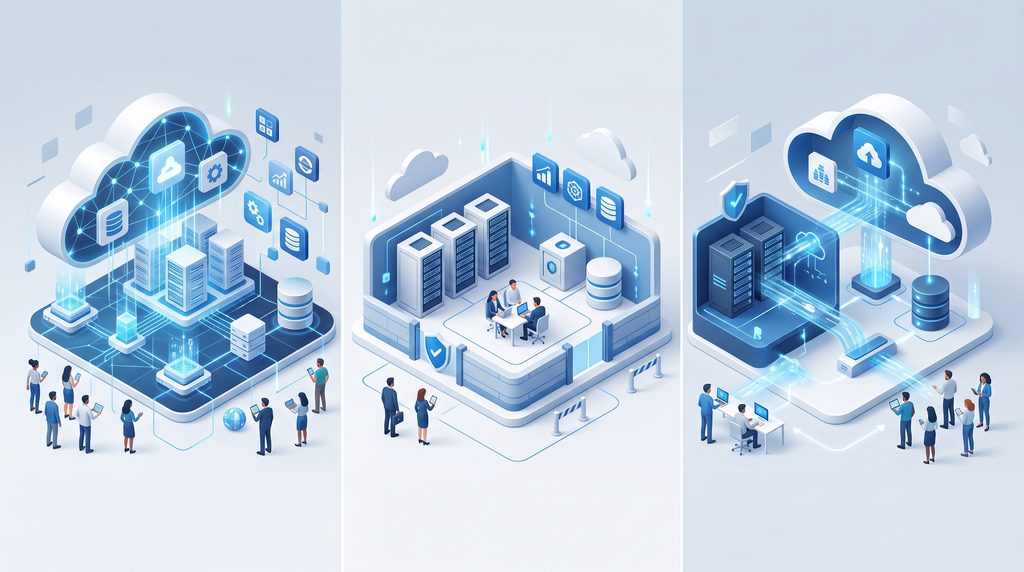
Cloud environments are generally divided into three major deployment models: public cloud, private cloud, and hybrid cloud.
Public Cloud
A public cloud provides computing services through infrastructure operated by a third-party provider.
Businesses and individuals can access resources without owning the physical data center infrastructure themselves.
Public cloud environments can be useful for organizations that want flexibility and scalability without making a large investment in physical hardware.
Private Cloud
A private cloud is designed for a single organization.
It can provide greater control over infrastructure, configurations, and access. Organizations with specific operational or compliance requirements may choose this model.
Private cloud environments can be hosted within an organization’s own infrastructure or managed by an external provider.
Hybrid Cloud
A hybrid cloud combines public and private cloud environments.
For example, a company might keep sensitive workloads in a private environment while using public cloud resources for applications that need additional scalability.
This approach can give organizations more flexibility when deciding where different workloads should operate.
Cloud Service Models
Cloud services can also be divided into three common service models: Infrastructure as a Service, Platform as a Service, and Software as a Service.
Infrastructure as a Service
Infrastructure as a Service, commonly called IaaS, provides basic computing resources such as virtual machines, storage, and networking.
Instead of purchasing physical servers, businesses can use virtual infrastructure according to their needs.
This model is often useful for organizations that want control over their computing environment without managing physical hardware.
Platform as a Service
Platform as a Service, or PaaS, provides developers with an environment for building, testing, and deploying applications.
The provider manages much of the underlying infrastructure, allowing developers to focus more on application development.
Software as a Service
Software as a Service, commonly known as SaaS, delivers software through the internet.
Users generally access these applications through a web browser or dedicated application rather than installing and maintaining the entire system locally.
Email platforms, collaboration applications, online office tools, and customer management software are common examples.
Benefits of Cloud Computing
Cloud technology provides several advantages for businesses and individual users.
1. Lower Hardware Requirements
Organizations may not need to purchase large amounts of physical infrastructure when they use cloud services.
This can reduce the need for maintaining servers and other hardware internally.
2. Scalability
Cloud platforms can make it easier to increase or decrease computing resources as workloads change.
For example, an e-commerce website may need additional resources during a major sales event and fewer resources during quieter periods.
3. Remote Access
Cloud applications and stored information can often be accessed from different locations using an internet connection and appropriate authentication.
This makes cloud services particularly useful for organizations with remote or distributed teams.
4. Data Backup
Cloud-based backup services can provide additional copies of important files and information.
If a local device experiences hardware failure, an available cloud backup may help users recover their data.
5. Faster Deployment
Cloud infrastructure can allow organizations to deploy computing resources faster than traditional hardware procurement.
Developers can create virtual environments without waiting for physical servers to be purchased and installed.
Real-World Uses of Cloud Computing
Cloud computing is used across many areas of modern technology.
Online Storage
Cloud storage allows users to store documents, photographs, videos, and other files on remote infrastructure.
These files can often be accessed from computers, tablets, and smartphones.
Website Hosting
Many websites and web applications operate using cloud infrastructure.
Cloud platforms can provide resources that scale according to traffic and application requirements.
Streaming Services
Video and music streaming platforms require large amounts of computing and storage infrastructure.
Cloud technology can help these platforms deliver digital content to users across different regions.
Business Applications
Companies use cloud-based applications for communication, accounting, project management, customer service, collaboration, and many other tasks.
Artificial Intelligence
Artificial intelligence applications can require significant processing power and storage.
Cloud platforms can provide access to powerful computing resources for machine learning and artificial intelligence applications.
Is Cloud Computing Secure?
Cloud computing can provide advanced security capabilities, but security is not completely automatic.
Cloud providers generally use technologies such as encryption, authentication systems, monitoring, access controls, and infrastructure protection.
However, customers also have responsibilities. Cloud computing can provide advanced security capabilities, but security is not completely automatic. Organizations should use strong authentication, access controls, encryption, and regular monitoring to protect cloud-based resources.
Weak passwords, excessive user permissions, exposed databases, and incorrect configurations can create security risks. Main NIST ko recommend karta hoon, kyunki ye U.S. National Institute of Standards and Technology hai aur cloud/security topic ke liye authoritative source hai.
Organizations should therefore use strong authentication, limit access to sensitive resources, regularly review permissions, and maintain appropriate backups.
Cloud Computing and the Future of Technology
Cloud computing is likely to remain an important part of the technology industry as organizations continue adopting artificial intelligence, data analytics, connected devices, and modern software.
Edge computing may also work alongside cloud infrastructure. Instead of sending every piece of information to a distant data center, some workloads can be processed closer to where the data is generated.
This can be useful for applications where fast response times are important.
Cloud platforms are also becoming increasingly connected with automation and AI technologies. These developments could make it easier for organizations to deploy, manage, and scale complex digital systems.

Cloud Computing vs. Traditional IT Infrastructure
Traditional IT infrastructure usually requires organizations to purchase, operate, and maintain physical hardware.
Cloud computing shifts much of this infrastructure management to cloud service providers.
This does not mean traditional infrastructure has completely disappeared. Some organizations continue to operate their own servers because of specific security, compliance, performance, or business requirements.
However, cloud services can provide an alternative that offers greater flexibility for many workloads.
The best choice often depends on the organization’s budget, technical requirements, security needs, and long-term strategy.
Final Thoughts
Cloud computing has become a fundamental part of modern technology.
It allows users and organizations to access computing resources without relying entirely on locally owned hardware. From online storage and website hosting to business applications and artificial intelligence, cloud infrastructure supports a wide range of digital services.
Its scalability, remote accessibility, and flexible resource management make it attractive to businesses of different sizes.
At the same time, organizations need to consider security, costs, data protection, and configuration when adopting cloud services.
As technologies such as AI, IoT, automation, and edge computing continue to develop, cloud computing will likely remain an important foundation for the digital world.