
Cloud Computing: How It Works, Types, Benefits, and Real-World Uses
The rise of cloud technology has changed how businesses and individuals manage their digital needs. Rather than depending solely on local computers, storage, and physical servers, users can access computing services over the internet.
From storing photos and documents to running business applications and streaming content, cloud-based services are now part of everyday digital life. Many people use cloud technology without even realizing it.
In simple terms, cloud computing allows users to access computing resources when they need them without having to own and maintain all of the underlying hardware themselves.
What Is Cloud Computing?
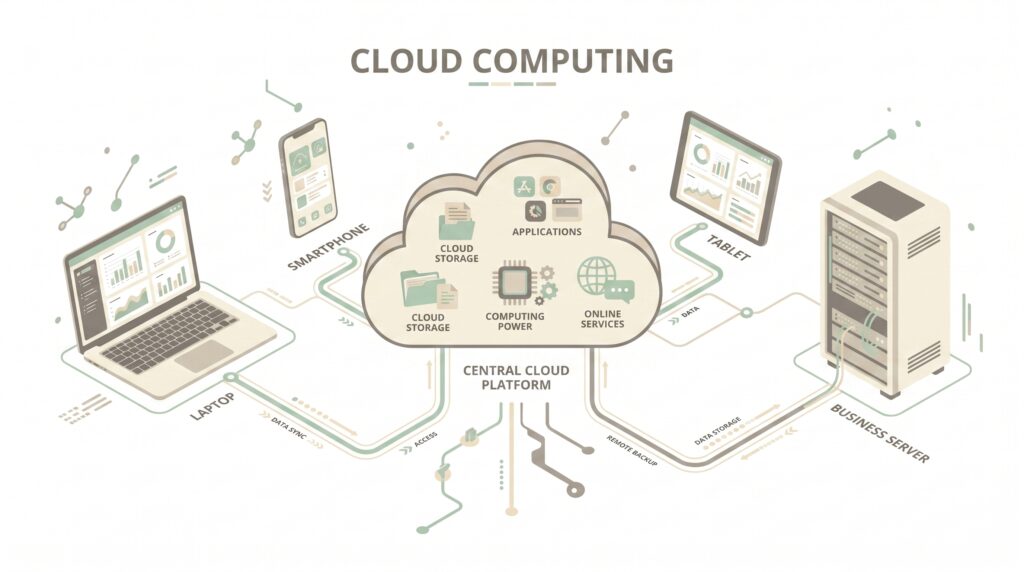
Cloud computing is the delivery of computing resources over the internet. These resources can include storage, servers, databases, networking, software, and processing power.
Traditionally, a company might purchase physical servers and keep them inside its own facility. Employees and applications would then rely on that hardware for storing information and running software.
With cloud services, much of that infrastructure can be provided by a third-party cloud provider. Users can access the resources remotely and, depending on the service, increase or decrease their usage as their needs change.
For example, instead of saving every document only on a computer’s internal drive, a user can store files through an online cloud storage service and access them from multiple devices.
This approach can make computing more flexible and easier to scale. Cloud infrastructure can also provide the computing resources needed by technologies such as machine learning, especially when applications require significant processing power.
How Does Cloud Computing Work?
At a basic level, cloud computing works by connecting users and applications to remote computing infrastructure through the internet.
A cloud provider operates large data centers containing servers, storage systems, networking equipment, and other infrastructure. These systems work together to provide services to customers.
When a user opens a cloud-based application or accesses a file stored online, their device communicates with the provider’s infrastructure through an internet connection.
The provider’s systems process the request and return the required information or service to the user’s device.
A Simple Example
Imagine that you save a photograph to a cloud storage service from your smartphone.
The basic process looks like this:
Smartphone → Internet → Cloud Infrastructure → Stored File
Later, you can sign in from another device and access the same photograph.
The physical storage still exists somewhere in a data center, but you do not need to know exactly which server contains your file.
This abstraction is one of the key ideas behind cloud computing.
Why Businesses Use Cloud Computing
Businesses often need computing resources that can change as their operations grow.
A small company may initially require only a limited amount of storage and processing power. As the company gains customers, it may need additional infrastructure.
Buying new physical hardware every time demand increases can be expensive and time-consuming.
Cloud platforms can provide a more flexible alternative. Organizations can often increase resources when demand rises and reduce them when those resources are no longer required.
This flexibility can be especially useful for websites, applications, online stores, and other services that experience changing levels of traffic.
Main Types of Cloud Computing
Cloud computing is not a single type of service. It can be divided into several categories based on how resources are provided and managed.
The three commonly discussed service models are Infrastructure as a Service (IaaS), Platform as a Service (PaaS), and Software as a Service (SaaS).
Infrastructure as a Service (IaaS)
IaaS gives users access to essential computing resources through cloud-based infrastructure.
Depending on the provider, this can include the following:
- Virtual machines
- Storage
- Networking
- Computing resources
- Virtual infrastructure
Instead of purchasing physical servers, an organization can rent virtual infrastructure according to its requirements.
IaaS gives technical teams considerable control, but it also requires more management than higher-level cloud services.
Platform as a Service (PaaS)
PaaS provides a development environment that allows developers to build and deploy applications without managing every part of the underlying infrastructure.
The cloud provider typically handles much of the infrastructure, while developers can concentrate more on application development.
This can make the development process more convenient for teams that do not want to manage physical servers and operating environments themselves.
Software as a Service (SaaS)
SaaS provides software applications through the internet.
Users generally access these applications through a web browser or dedicated application instead of installing and maintaining the complete software infrastructure themselves.
Common examples include online email platforms, collaboration applications, customer management systems, and cloud-based productivity tools.
For everyday users, SaaS is often the most visible form of cloud computing.
Public, Private, and Hybrid Clouds
Cloud environments can also be categorized according to how their infrastructure is deployed.
Public Cloud
A public cloud is operated by a third-party provider and makes computing resources available to multiple customers.
Organizations can use these services without building their own complete cloud infrastructure.
Private Cloud
A private cloud is designed for use by a single organization.
It can provide greater control over infrastructure and may be suitable for organizations with specific security, compliance, or operational requirements.
Hybrid Cloud
A hybrid cloud combines private and public cloud environments.
An organization might keep certain workloads in a private environment while using public cloud resources for other applications or changing workloads.
This approach can provide additional flexibility, although managing multiple environments can also increase complexity.
Benefits of Cloud Computing
Cloud computing has become popular because it offers flexibility that can be difficult to achieve with traditional on-site infrastructure. Instead of purchasing and maintaining every piece of hardware, organizations can access computing resources according to their requirements.
Scalability
One of the biggest advantages is scalability.
A website may receive a small number of visitors on a normal day but experience a sudden increase in traffic during a major event or promotion. Cloud infrastructure can allow organizations to increase computing resources when demand rises.
When demand decreases, they can reduce those resources instead of keeping unused hardware running continuously.
This makes cloud services particularly useful for businesses with changing workloads.
Lower Infrastructure Requirements
Traditional IT environments often require companies to purchase servers, storage equipment, networking hardware, and other infrastructure.
Cloud services can reduce the need to maintain all of this equipment on-site.
The cloud provider manages much of the underlying infrastructure, while the customer focuses on using the services needed for its applications and operations.
Remote Accessibility
Cloud-based services can often be accessed from different locations as long as users have an appropriate internet connection and the required permissions.
This is especially useful for:
- Remote employees
- Distributed teams
- Online businesses
- Students
- Freelancers
- Organizations with multiple offices
Cloud-based collaboration can allow people to work with the same documents and applications without being physically located in the same building.
Faster Deployment
Cloud platforms can make it easier to deploy new applications and computing resources.
Instead of waiting for physical hardware to be purchased, delivered, installed, and configured, organizations can often provision cloud resources much more quickly.
This can help development teams test ideas and launch applications faster.
Automatic Maintenance
Depending on the service model, the cloud provider may handle tasks such as infrastructure maintenance, hardware replacement, and certain software updates.
The amount of responsibility depends on whether the organization uses IaaS, PaaS, or SaaS.
Real-World Uses of Cloud Computing
Cloud technology is not limited to large corporations. People interact with cloud-based services every day.
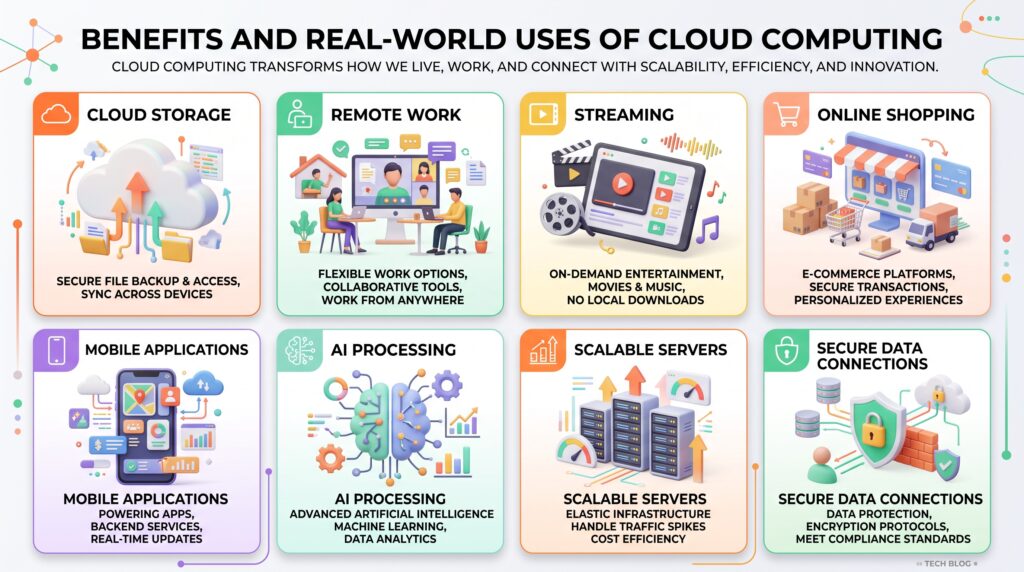
Cloud Storage
Cloud storage allows users to save files on remote infrastructure and access them through the internet.
Photos, videos, documents, and other files can be synchronized across supported devices.
This can also make file sharing easier because users can provide access to specific files or folders instead of sending large attachments.
Video and Music Streaming
Streaming platforms rely heavily on distributed computing and storage infrastructure to deliver content to users.
Instead of downloading an entire movie or music library to a device, users can request content when they want to watch or listen to it.
The required data is delivered through internet-connected infrastructure.
Online Collaboration
Cloud-based productivity platforms allow multiple people to work with documents, spreadsheets, presentations, and other files.
Changes can often be synchronized so team members can access updated versions from different locations.
This has become particularly valuable for remote and hybrid workplaces.
Online Shopping
E-commerce websites can use cloud infrastructure to handle product catalogs, customer accounts, payments, databases, and changing levels of website traffic.
During major shopping events, additional computing resources can help businesses handle increased demand.
Mobile Applications
Many mobile apps depend on cloud-based services to store information, authenticate users, synchronize data, or process requests.
For example, an application may store a user’s preferences remotely so those settings can become available when the person signs in from another device.
Cloud Computing and Artificial Intelligence
Cloud platforms have also become important for modern artificial intelligence applications.
AI workloads can require substantial processing power, storage, and specialized computing hardware. Instead of purchasing expensive infrastructure, organizations can access computing resources through cloud platforms.
This can make it easier for developers and businesses to experiment with AI applications and scale them as their requirements change.
For example, cloud infrastructure can support the following:
- AI model training
- Data processing
- Machine learning applications
- Image analysis
- Natural language applications
- Automated business systems and cloud infrastructure can also support technologies such as AI agents, which may require remote computing resources to process information and perform tasks.
Cloud Computing and Data Security
Moving information and applications to the cloud does not eliminate security concerns.
Organizations still need to protect accounts, data, applications, and access permissions.
Important security practices can include:
- Strong passwords
- Multi-factor authentication
- Encryption
- Access controls
- Regular security updates
- Monitoring
- Reliable backups
For additional online security guidance, users can also refer to CISA’s Secure Our World resources.
Cloud providers typically offer security features, but customers are still responsible for configuring and using those services correctly. For additional online security guidance, users can also refer to CISA’s Secure Our World resources.
This is often described through the shared responsibility model, where the provider and customer have different security responsibilities depending on the service being used.
For example, a provider may be responsible for protecting the underlying physical infrastructure, while a customer may remain responsible for account permissions and the data stored within its environment.
Cloud Computing vs Traditional Computing
Traditional computing usually depends more heavily on physical infrastructure owned and managed directly by an organization or individual.
Cloud computing shifts some of that responsibility to a service provider.
| Feature | Traditional Computing | Cloud Computing |
| Hardware | Usually owned or directly managed | Usually provided by a cloud provider |
| Scaling | Often requires additional hardware | Resources can often be adjusted |
| Maintenance | Customer responsibility | The provider handles much of the infrastructure |
| Access | Often tied to local infrastructure | Typically accessible through the internet |
| Deployment | Can take longer | Often faster |
| Cost model | Hardware and maintenance costs | Often usage- or subscription-based |
The right approach depends on the specific needs and requirements of each situation. The right choice depends on an organization’s requirements, budget, security needs, workload, and technical capabilities.
Is Cloud Computing Always Better?
Cloud computing offers many advantages, but it also comes with limitations.
Many cloud-based services depend on a stable internet connection for reliable access. Organizations also need to consider recurring costs, security configuration, privacy requirements, provider availability, and potential dependence on a particular platform.
For some workloads, maintaining infrastructure locally may still make sense.
The best approach is usually to evaluate the specific requirements of a project rather than assuming that every application should automatically move to the cloud.
Disadvantages and Challenges of Cloud Computing
Although cloud computing offers flexibility and convenience, it is not without limitations. Organizations and individuals should understand these challenges before moving important workloads or information to cloud-based services.
Internet Dependence
Many cloud services require a reliable internet connection.
If the connection is slow or unavailable, users may have difficulty accessing applications, files, or other resources. Some services offer offline functionality, but this depends on the specific platform.
Security and Privacy Concerns
Storing information on remote infrastructure means organizations need to carefully manage access and security.
Weak passwords, excessive permissions, misconfigured services, and compromised accounts can create security risks.
Organizations should therefore use appropriate authentication, access controls, encryption, monitoring, and backup strategies.
Recurring Costs
Cloud services commonly use subscription-based or usage-based pricing.
This can be convenient because organizations do not necessarily need to purchase large amounts of hardware upfront. However, poorly managed resources can result in unexpected or unnecessary expenses.
Businesses should monitor usage and regularly review which cloud resources they actually need.
Vendor Lock-In
Moving applications and data between different cloud providers is not always simple.
An organization may become dependent on particular tools, services, or technologies provided by one company. Changing providers later could require additional time, money, and technical work.
For larger projects, portability should be considered during the planning stage.
Cloud Computing Security Best Practices
Organizations using cloud services should treat security as an ongoing responsibility.
Some practical measures include:
Use multi-factor authentication.
Multi-factor authentication can provide an additional layer of protection if a password is compromised.
Apply the Principle of Least Privilege
Users should receive only the permissions they need to perform their responsibilities.
Limiting unnecessary access can reduce the potential impact of a compromised account.
Monitor Account Activity
Regularly reviewing login activity, access logs, and unusual behavior can help organizations identify potential problems earlier.
Keep Backups
Important information should not depend on a single storage location. Maintaining appropriate backups can help reduce the impact of accidental deletion, system failures, or security incidents.
The Future of Cloud Computing
Cloud technology is likely to remain an important part of the technology industry as organizations continue adopting digital services.
Several developments are shaping its future.
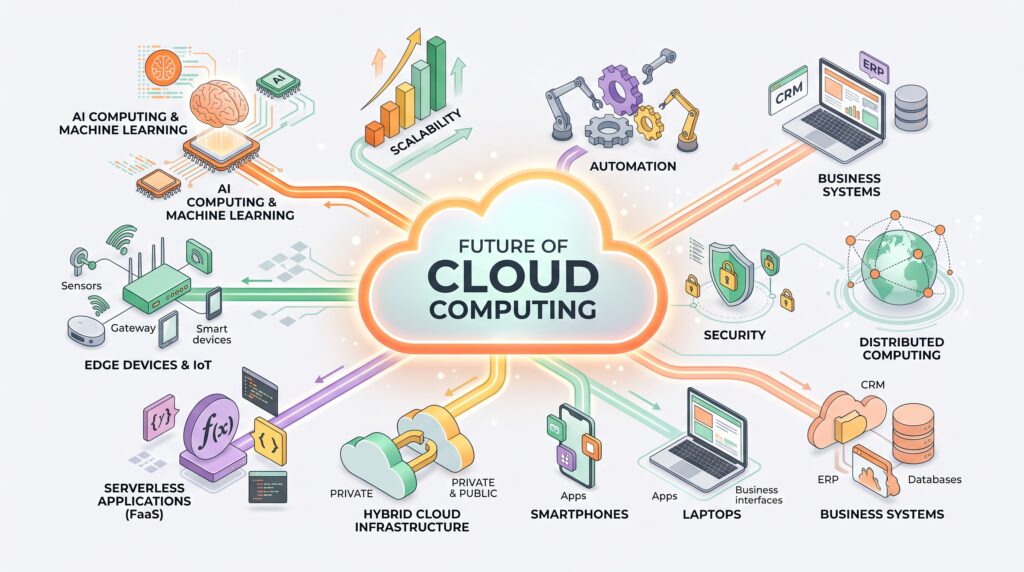
Cloud and Artificial Intelligence
AI applications can require significant computing resources. Cloud platforms can provide access to scalable infrastructure that supports data processing, model development, and AI-powered applications.
This combination is likely to remain important as businesses experiment with increasingly advanced intelligent software.
Edge Computing
Some applications need information to be processed closer to where it is generated.
Edge computing can complement cloud infrastructure by handling certain workloads closer to users or connected devices. This can be useful for applications where latency is particularly important.
Serverless Computing
Serverless services allow developers to run application code without managing traditional server infrastructure directly.
The cloud provider handles much of the underlying infrastructure, while developers focus primarily on application logic.
This approach can simplify development for certain types of applications.
Hybrid Cloud Environments
Some organizations may continue using combinations of public cloud, private infrastructure, and edge systems.
This can allow businesses to choose different environments based on security requirements, performance needs, regulatory considerations, and workload characteristics.
Frequently Asked Questions
What is cloud computing in simple terms?
Cloud computing means accessing computing resources such as storage, software, servers, and processing power through the internet instead of relying entirely on local hardware.
What are the main types of cloud computing?
Cloud services generally fall into three major categories: Infrastructure as a Service (IaaS), Platform as a Service (PaaS), and Software as a Service (SaaS). Cloud environments can also be categorized as public, private, or hybrid.
Is cloud computing secure?
Cloud computing can provide strong security capabilities, but security depends on proper configuration, authentication, access management, monitoring, and other practices.
Is cloud computing expensive?
Costs vary depending on the services used and the amount of resources consumed. Cloud platforms can reduce upfront infrastructure expenses, but organizations need to monitor ongoing usage.
What are some everyday examples of cloud computing?
Cloud storage, streaming services, online collaboration tools, web applications, mobile apps, and many online shopping platforms rely on cloud infrastructure.
What is the difference between cloud computing and cloud storage?
Cloud storage specifically focuses on storing and accessing data remotely. Cloud computing is broader and includes storage as well as servers, databases, networking, software, and processing resources.
Final Thoughts
Cloud computing has become an important part of modern technology because it allows individuals and organizations to access computing resources without managing all of the underlying physical infrastructure themselves.
From cloud storage and online collaboration to artificial intelligence and business applications, cloud-based services support many technologies people use every day.
However, moving to the cloud does not automatically solve every technology or security challenge. Organizations still need to consider costs, privacy, access controls, performance, backups, and provider dependence.
As AI, edge computing, serverless platforms, and hybrid environments continue developing, cloud infrastructure will likely remain an important foundation for digital services.
Understanding cloud computing today can therefore help users and businesses make better decisions about how they store information, run applications, and use modern technology.