Passkeys Explained: How They Work, Security Benefits, and the Future of Passwordless Login
Passwords have been the standard way to protect online accounts for decades, but they come with several weaknesses. People often forget passwords, reuse the same credentials across multiple websites, or fall for phishing attempts designed to steal login information.
Passwordless authentication offers a different approach. Instead of asking users to remember a password, passkey-based authentication can use a device’s built-in security features, such as a fingerprint, face recognition, PIN, or screen lock.
This technology is designed to make account sign-ins easier while reducing some of the risks associated with traditional passwords.
In this guide, we’ll explain what these authentication methods are, how they work, how they compare with passwords, their security benefits, limitations, and what passwordless authentication could look like in the future.
What Are Passkeys?
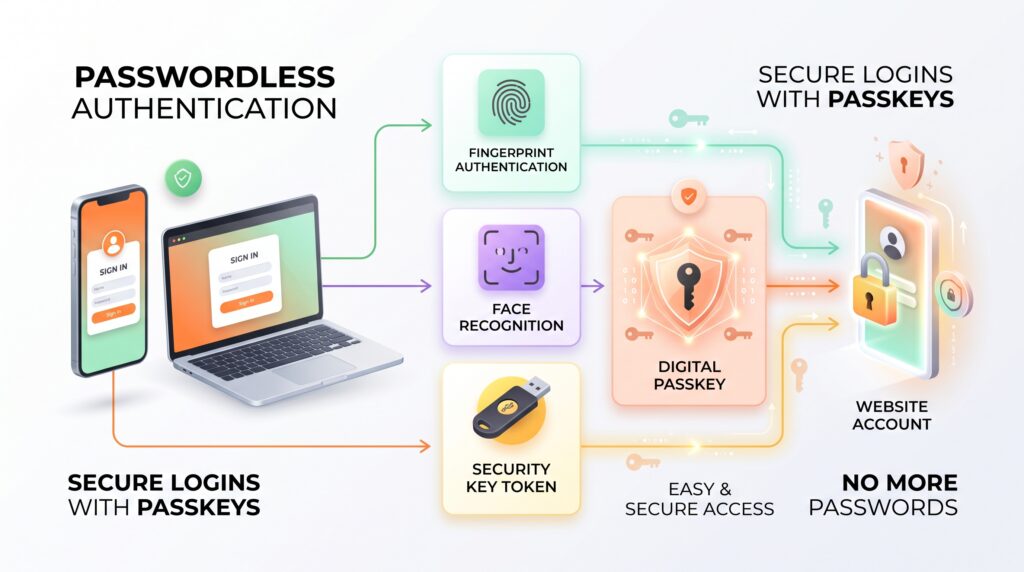
Passkeys are a passwordless sign-in technology based on public-key cryptography.
Instead of creating a password that is stored or remembered by the user, this technology uses a pair of cryptographic keys.
One part of the key pair is stored securely on the user’s device or within an approved credential system, while the corresponding public key is registered with the website or service.
When the user signs in, the device can verify that the correct private key is available without sending the private key to the website.
The user may confirm the login using a fingerprint, face recognition, device PIN, or another supported screen-lock method.
The FIDO Alliance and W3C have developed standards that support this type of authentication, helping passkeys work across modern websites, operating systems, and devices.
How Do Passkeys Work?
Passkeys can seem complicated because they rely on cryptography, but the basic idea is relatively simple.
1. Creating a Passkey
When a website supports passwordless login, the user can choose an option such as “Create a passkey.”
The device then generates a cryptographic key pair.
The private key stays protected by the device or credential system, while the public key is provided to the online service.
2. Protecting the Private Key
The private part of the credential is not supposed to be shared with the website.
Depending on the device and ecosystem, it may be protected using hardware-backed security or another secure credential mechanism.
This is one of the important differences between passwordless authentication and traditional passwords.
3. Signing In
Later, when the user attempts to sign in, the website sends an authentication request.
The device verifies the user’s presence or identity through a supported method such as a fingerprint, face scan, PIN, or screen lock.
The device then uses the private key to complete the authentication process.
4. Website Verification
The website uses the registered public key to verify the authentication response.
If the cryptographic verification succeeds, the user can be signed in without typing a password.
The process can happen quickly, which is why passkeys can feel similar to unlocking a smartphone.
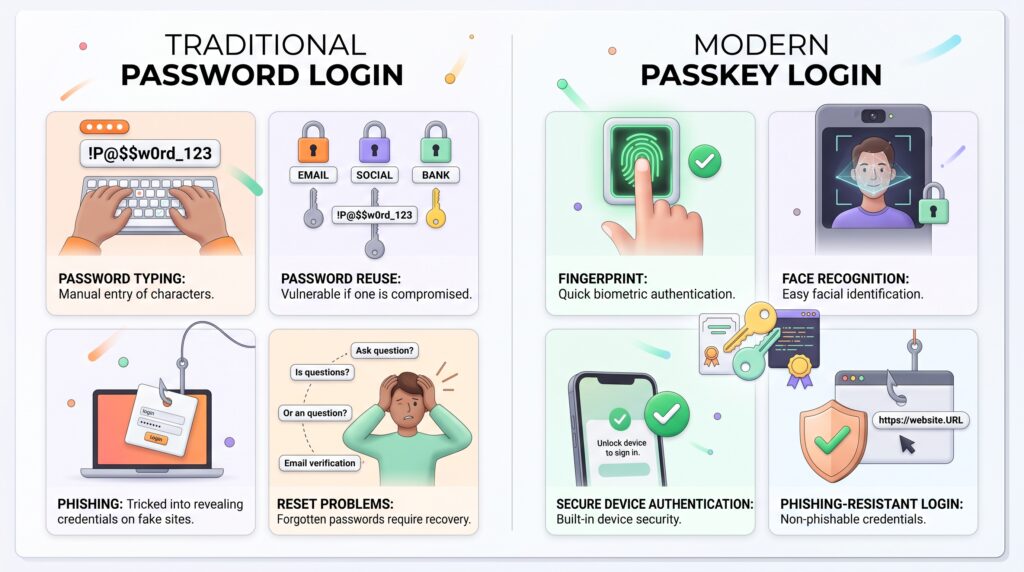
Passkeys vs Passwords
The biggest difference is how the user’s credentials are handled.
With a traditional password, the user creates a secret string and enters it into a website.
The security of that account can depend on factors such as password strength, password reuse, phishing protection, and how the service stores and protects password information.
With this authentication method, authentication is based on cryptographic keys instead.
| Feature | Passwords | Passkeys |
| The user must remember a secret | Usually yes | Usually not. |
| Phishing resistance | Limited | Designed to be stronger |
| Password reuse risk | Possible | Not applicable in the same way |
| Sign-in method | Typed password | Device authentication |
| Cryptographic keys | Not normally visible to user | Core part of authentication |
| Recovery | Password reset | Depends on account/device ecosystem |
This does not mean passwords suddenly become useless. Many websites still depend on them, and users may continue encountering passwords for years.
However, passkeys provide an alternative that can reduce several common password-related risks.
Why Are Passkeys Considered More Secure?
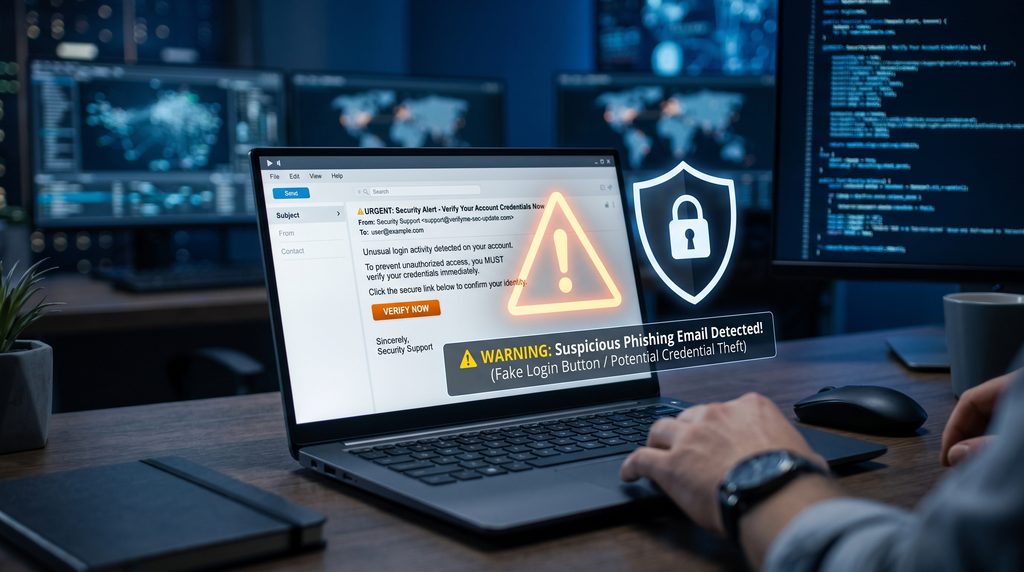
One of the main reasons passkeys are attracting attention is their resistance to certain types of phishing.
A traditional phishing website may attempt to trick a user into entering a username and password.
If the user provides those credentials, the attacker may be able to use them elsewhere.
Passkeys work differently because authentication relies on a cryptographic credential associated with the legitimate website or service.
A fake website generally cannot simply ask the user to type the private key into a form.
This makes passkeys resistant to many common credential-phishing techniques.
However, no authentication system is completely risk-free. Account recovery, compromised devices, malware, social engineering, and poorly secured services can still create security concerns.
Key Benefits of Passkeys
Easier Sign-In
Users do not need to remember another complicated password.
Instead, they can often authenticate using a method they already use to unlock their device.
For many people, this can make the login process faster and less frustrating.
Reduced Password Reuse
Password reuse is a common security problem.
If someone uses the same password for several services and one account is compromised, attackers may try those credentials on other websites.
This technology does not depend on users creating and reusing passwords for each service in the same way.
Stronger Protection Against Phishing
These credentials are designed around public-key cryptography and domain-bound authentication.
This can make it significantly harder for ordinary phishing pages to capture usable login credentials.
No Password to Type
Typing passwords on mobile devices can be inconvenient, especially when passwords are long and randomly generated.
With passkeys, the user may simply confirm their identity using a fingerprint, face recognition, PIN, or device unlock method.
Better User Experience
Security features are more useful when people are willing to use them.
Because passwordless login can simplify authentication, they may encourage users to move away from weak or reused passwords.
Where Are Passkeys Used?
This security method is increasingly available across major technology platforms and online services.
They can be used for different types of accounts, including:
- Email accounts
- Social platforms
- Shopping websites
- Financial services
- Productivity applications
- Developer platforms
- Enterprise services
- Cloud accounts
- Passkeys can also help protect accounts connected to cloud computing services and other online platforms.
Support varies by website, operating system, device, and account provider.
Users may see passkeys presented as an additional sign-in option alongside passwords or multi-factor authentication.
Over time, more services may offer the authentication system as part of their authentication systems.
Passkeys on Smartphones and Computers
Modern smartphones can make passkeys particularly convenient because they already contain security features designed to verify the person using the device.
For example, a user may create a passkey and later authenticate using:
- Fingerprint recognition
- Face recognition
- Device PIN
- Screen lock
- Security keys
- Other supported authentication methods
On computers, passkeys can work through built-in device authentication or an external security device.
The exact experience depends on the operating system, browser, hardware, and website.
Passkeys and Password Managers
Passkeys and password managers are not necessarily competing technologies.
Password managers can continue to be useful for storing passwords, generating strong credentials, and managing accounts that do not yet support passkeys.
Many modern password-management systems can also work with passkeys.
This can be useful during the transition from traditional passwords to passwordless authentication.
For example, a user might still use a password manager for older websites while using passkeys on services that support them.
This gradual transition means people do not necessarily have to change every account at once.
Are Passkeys the Same as Biometrics?
No.
This is an important distinction.
A fingerprint or face scan may be used to unlock or authorize a passkey, but the biometric information itself is not the passkey.
The biometric method is typically used by the device to verify the person attempting to use the credential.
The underlying authentication relies on cryptographic keys.
This means users can think of biometrics as one way of unlocking or authorizing a passkey rather than the passkey itself.
What Happens If You Lose Your Device?
Device loss is one of the practical concerns people may have when considering passkeys.
The answer depends on how the passkey is stored and synchronized.
Some passkey systems can securely synchronize credentials across a user’s devices through an account or credential manager.
Other login credentials may be tied more closely to a particular device or security key.
Users should therefore understand the recovery options provided by the service before relying entirely on passkeys.
Keeping account recovery information updated and having an appropriate backup authentication method can be useful.
Caption: Passkeys provide a passwordless authentication option designed to reduce common password-related security risks.
Limitations and Challenges of Passkeys
Despite their advantages, passkeys are not a perfect solution for every situation.
Limited Website Support
Not every website supports passkeys yet.
Users may still need traditional passwords for many older or less frequently updated services.
Account Recovery
Losing access to devices or credential ecosystems can create recovery challenges.
Services need reliable account recovery systems, and users should understand how those systems work.
Device Compatibility
The passkey experience can vary depending on the device, browser, operating system, and service.
Some older hardware may not provide the same level of support as newer devices.
User Confusion
Passkeys are still relatively new to many users.
People may not immediately understand the difference between a passkey, password, biometric authentication, and a security key.
Clear user interfaces and good account-recovery processes are therefore important.
Are Passkeys Better Than Two-Factor Authentication?
This comparison requires some care.
Passkeys and two-factor authentication are not exactly the same concept.
Traditional two-factor authentication can add another security step after a password, such as an authenticator app code or security key.
A properly implemented passkey can provide strong authentication without requiring the user to type a password first.
In some environments, passkeys can therefore reduce the need for traditional password-plus-code authentication.
However, security requirements vary by account and organization. Some high-risk accounts may continue using additional authentication controls.
The Future of Passwordless Authentication
Passkeys represent a broader movement toward passwordless authentication.
As more websites, operating systems, browsers, and applications adopt modern authentication standards, users may gradually encounter fewer situations where they need to create and remember passwords.
The transition will probably not happen overnight.
Older services, legacy systems, account recovery processes, and user habits can all slow adoption.
Still, the underlying idea is significant: instead of making users repeatedly prove their identity by remembering secrets, modern authentication can rely more heavily on cryptographic credentials protected by trusted devices.
This could make online sign-ins simpler while reducing exposure to several common password attacks.
Frequently Asked Questions
Are passkeys safe?
Passkeys are designed to provide strong authentication and resist many common phishing attacks. However, users should still protect their devices, recovery methods, and accounts.
Can passkeys be hacked?
No security technology can guarantee complete protection. Attackers may target devices, account recovery processes, malware, or users themselves rather than directly stealing a passkey’s private key.
Do passkeys replace passwords?
They can replace passwords on services that support them, but passwords will likely remain in use for some time because many websites and systems still depend on them.
Do I need a fingerprint to use a passkey?
No. A fingerprint is only one possible authentication method. Depending on the device, users may authenticate with face recognition, a PIN, screen lock, or another supported method.
Can I use passkeys on multiple devices?
In many cases, yes. Some systems allow credentials to synchronize securely across devices, while other passkeys may be stored on a particular device or security key.
Conclusion
Passkeys provide a modern alternative to traditional password-based authentication.
By using public-key cryptography and device-based authentication, they can simplify sign-ins while reducing several common risks associated with password reuse and phishing.
They are not a universal replacement for every existing authentication method, and users still need to consider device security, recovery options, compatibility, and account protection.
However, as more websites and technology platforms adopt passwordless authentication standards, passkeys are likely to become increasingly common.
For everyday users, understanding how passkeys work can be a useful step toward making online accounts easier to access and better protected.