On-Device AI Explained: How It Works, Benefits, Uses, and Future Trends
Artificial intelligence is becoming part of everyday technology, from smartphones and laptops to cameras, vehicles, and smart home devices. Traditionally, many AI tasks have depended on remote servers and cloud platforms to process data. However, a growing number of devices can now perform AI tasks locally.
This approach is commonly known as On-Device AI. Instead of sending every piece of information to a remote server, compatible devices can process certain AI workloads directly on the hardware.
This can potentially improve response times, reduce reliance on internet connectivity, and provide users with more control over sensitive information. As mobile processors and specialized AI hardware continue to improve, on-device processing is becoming increasingly relevant across consumer and business technology.
What Is On-Device AI?
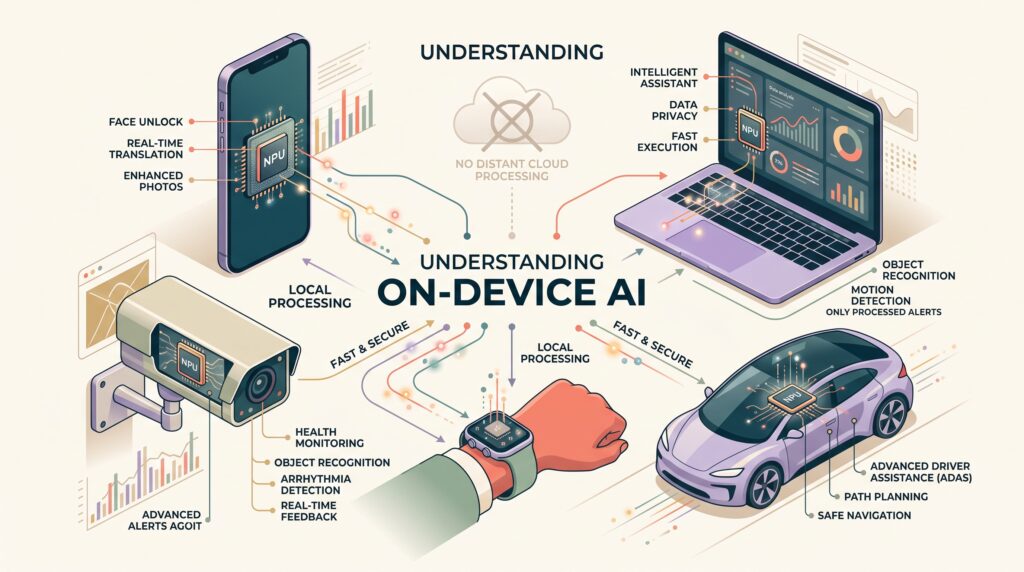
“On-device AI” refers to artificial intelligence models and workloads that run directly on a device rather than relying entirely on a remote cloud server.
The device could be a smartphone, laptop, tablet, camera, vehicle, wearable, industrial machine, or another connected system.
For example, a smartphone may use an AI model locally to recognize objects in a photograph, improve image quality, translate text, or perform voice-related tasks. Instead of sending all the raw information to a remote server, some processing can happen directly on the device.
This does not necessarily mean that cloud computing disappears. In many modern systems, local and cloud-based processing can work together. A device may handle simple or time-sensitive tasks locally while sending more complex workloads to a remote service.
How Does On-Device AI Work?
On-device AI generally depends on three important components: an AI model, suitable hardware, and software that allows the model to operate efficiently.
First, developers create or train an AI model for a particular task. The model may then be optimized so that it can operate within the limited processing power, memory, and battery capacity of a device.
Modern processors increasingly include specialized hardware designed to accelerate AI calculations. Depending on the device, this could include a neural processing unit, AI accelerator, graphics processor, or other specialized computing components.
When an application needs an AI capability, the device can run the optimized model locally. The model processes the available input and produces an output without necessarily sending the complete input to a remote server.
This architecture can be especially useful when an application needs a fast response or when internet connectivity is unreliable. Google Developers explains that LiteRT is designed to help developers deploy AI models directly on devices using CPU, GPU, and NPU acceleration.
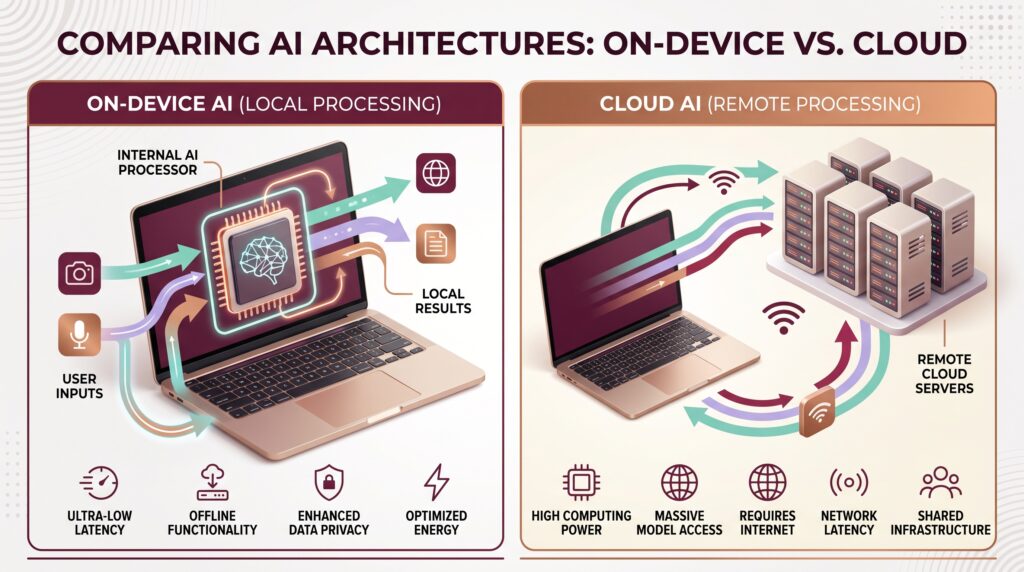
On-Device AI vs Cloud AI
On-device and cloud-based AI are not necessarily competing technologies. They represent different approaches to processing AI workloads.
With cloud computing, AI workloads can be processed on remote infrastructure rather than entirely on the local device.
With On-Device AI, processing happens closer to where the data is generated.
For example, consider a smartphone camera. A local AI model might identify a scene or improve an image directly on the phone. A more demanding task could still be sent to a cloud service.
This hybrid approach can allow developers to choose where different workloads should be processed.
Benefits of On-Device AI
Faster Response Times
One of the major advantages of local AI processing is the potential for faster responses.
When information does not need to travel to a remote server and return to the device, some applications can respond more quickly. This can be useful for features such as voice recognition, camera processing, translation, and interactive applications.
The actual improvement depends on the device, model, network conditions, and workload, but local processing can reduce communication-related delays.
Improved Privacy
On-device processing can also help reduce the amount of sensitive information that needs to leave a device.
For example, a phone could process certain voice commands, images, or personal information locally instead of sending the original data to a remote system.
However, on-device AI should not automatically be considered completely private. Applications still need appropriate security controls, permissions, encryption, and responsible data-handling practices.
Reduced Dependence on Internet Connectivity
Cloud-based AI usually requires a network connection. Local models can continue working for certain tasks when the connection is slow, unavailable, or unreliable.
This can be particularly useful for mobile devices, vehicles, industrial equipment, and applications operating in locations with limited connectivity.
An AI-powered application that performs its essential processing locally may remain useful even when the device temporarily goes offline.
Lower Data Transfer Requirements
Another potential advantage is reduced data movement.
Instead of continuously transferring raw images, audio, sensor information, or other data to a remote service, a device may process some information locally and send only selected results.
This can reduce network traffic for certain applications.
For organizations managing large numbers of connected devices, reducing unnecessary data transmission may also help improve the efficiency of their overall infrastructure.
More Personalized Experiences
Local AI can also support personalized device experiences.
A smartphone or computer may use information available on the device to adapt certain features to individual usage patterns. Examples could include personalized recommendations, smarter notifications, voice features, or device settings.
Because some processing can happen locally, developers may have more flexibility when designing features involving personal data.
Common Uses of On-Device AI
Smartphones
Smartphones are among the most visible examples of on-device AI.
Modern phones can use local AI capabilities for photography, voice features, language processing, security, image recognition, and other functions.
For example, an image-processing model may help a camera identify scenes and adjust settings automatically. Other AI features can operate on text, audio, or images without requiring every operation to be performed remotely.
Laptops and PCs
Personal computers are also becoming increasingly capable of running AI workloads locally.
AI-capable PCs can use specialized hardware to support features such as background effects, voice processing, image enhancement, productivity tools, and other applications.
As more software developers optimize models for local hardware, computers may be able to handle an expanding range of AI features without relying completely on cloud services.
Smart Cameras
Security and monitoring cameras can generate large amounts of video data.
Sending every video frame to a remote server can require significant network resources. A camera with local AI capabilities may instead analyze video directly and identify events such as movement or specific objects.
The system can then send selected alerts or results instead of continuously transferring all raw footage.
Wearable Devices
Smartwatches and other wearable devices collect information through sensors.
Local AI can potentially help these devices process certain sensor inputs directly. This may support features involving activity recognition, voice interaction, personalization, and other functions.
The ability to process information locally can be particularly useful for small devices with limited connectivity.
Vehicles
Connected and modern vehicles generate information from cameras, sensors, and other systems.
Local AI processing can help vehicles interpret information from their surroundings and respond to certain events quickly.
Applications may include driver assistance, object recognition, cabin monitoring, navigation-related functions, and predictive systems.
Vehicle AI requirements can vary considerably, and safety-critical systems require particularly careful engineering and validation.
Industrial Equipment
Factories can use AI-enabled machines and sensors to monitor equipment and production processes.
Instead of sending every sensor reading to a central server, some analysis can happen close to the equipment.
This can help applications identify unusual conditions, monitor machines, and support maintenance workflows with potentially lower response times.
On-Device AI and Edge Computing
On-device AI is closely related to edge computing, but the two terms are not identical.
On-Device AI specifically focuses on running AI workloads directly on a device.
Edge computing is a broader architecture in which computing and data processing are moved closer to the location where data is generated. Edge infrastructure can include gateways, local servers, network equipment, and other computing resources.
In some systems, both approaches can work together.
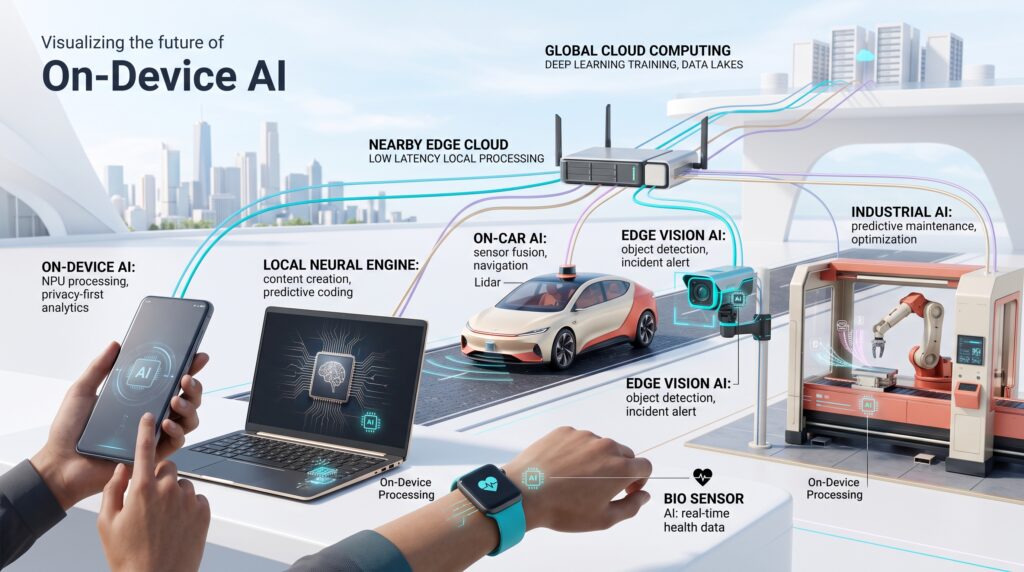
For example, a smart camera could run a lightweight AI model directly on the camera while a nearby edge server handles larger workloads. Selected information could then be transferred to a centralized cloud platform.
This layered approach can help organizations balance performance, connectivity, and computing requirements.
On-Device AI and Machine Learning
Machine learning is an important foundation for many on-device AI applications.
Developers can train models using powerful computing infrastructure and then optimize those models for local deployment. Techniques such as model compression, quantization, and efficient neural-network architectures can help reduce resource requirements.
The goal is to make models small and efficient enough to operate within the limitations of a particular device while maintaining useful performance.
However, not every AI model is suitable for local deployment. Large and computationally demanding models may still require cloud infrastructure or more powerful edge hardware.
Challenges of On-Device AI
Despite its advantages, on-device AI also has limitations.
Limited Hardware Resources
Smartphones, wearables, and other small devices have less computing power and memory than large cloud servers.
Developers therefore need to optimize models carefully.
Battery Consumption
AI processing can consume additional power. Running complex models repeatedly on a mobile device may affect battery life.
Efficient AI accelerators and optimized models can help reduce this problem, but power efficiency remains an important consideration.
Model Size
Large AI models can require substantial storage and memory.
Developers may need to create smaller versions of models or use techniques that reduce their computational requirements.
Security Risks
Local processing does not eliminate security threats.
AI models stored on devices could potentially be analyzed, modified, or attacked. Developers need to consider application security, hardware protection, model integrity, and user privacy when deploying local AI systems.
The Future of On-Device AI
The future of on-device AI will likely be influenced by improvements in processors, AI accelerators, model optimization, and software development tools.
As hardware becomes more capable, more devices may be able to run sophisticated AI workloads locally.
Another important direction is the growth of hybrid AI architectures. Instead of choosing entirely local or entirely cloud-based processing, applications can dynamically decide where a workload should run.
For example, a device might handle a simple task locally, send a more demanding task to an edge server, and use cloud infrastructure for extremely complex processing.
This could create a more flexible AI ecosystem where devices, edge infrastructure, and cloud platforms complement one another.
Privacy requirements may also encourage greater adoption of local processing. Businesses and consumers are increasingly paying attention to how personal and sensitive information is handled, although local processing alone cannot guarantee complete privacy.
Final Thoughts
On-Device AI is changing how artificial intelligence can be integrated into everyday technology. By processing certain workloads directly on smartphones, computers, cameras, vehicles, wearables, and industrial devices, local AI can potentially provide faster responses, reduce data transfer, improve offline capabilities, and support more privacy-conscious designs.
At the same time, cloud computing remains important for large and computationally demanding workloads. The most practical future may therefore involve a combination of on-device, edge, and cloud processing.
As AI hardware and efficient models continue to develop, local intelligence could become an increasingly common feature of the devices people use every day.